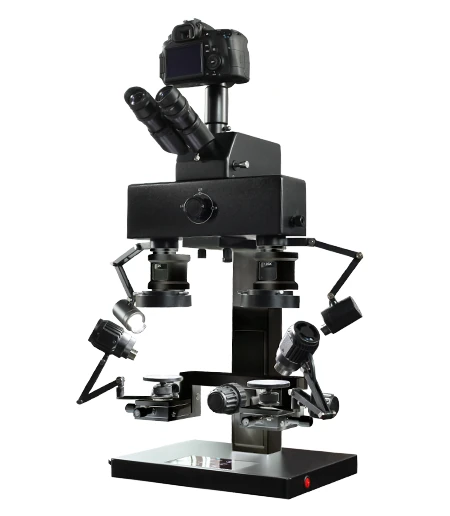
Plan the viewing and recording arrangement
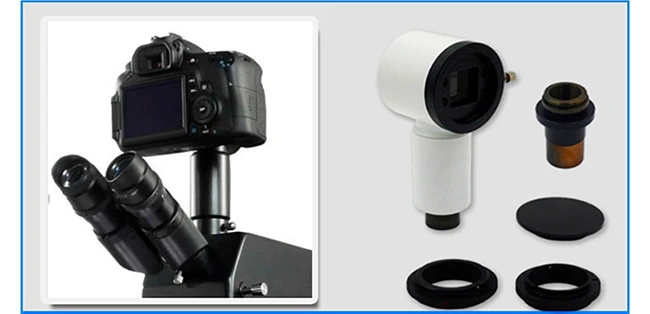
The model page describes a front-view photo adapter and a CCD camera adapter. That makes the camera connection a useful starting point for your inquiry. If you already have a camera, send its exact model and mount details. Ask which adapter is offered, where it attaches, and whether any additional connection parts are required.
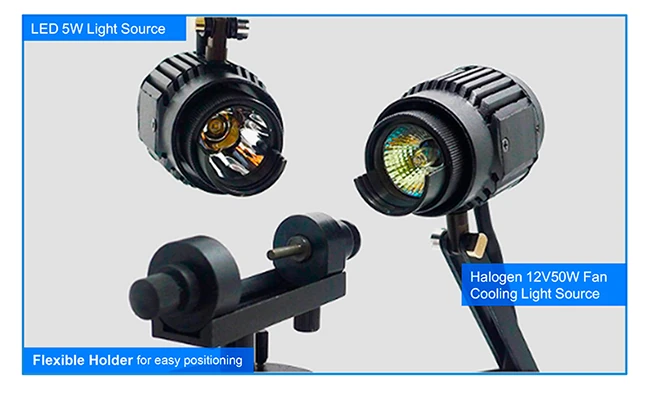
For illumination, the page lists an LED light source and a fan-cooled halogen light source. It also identifies ultraviolet lenses and filters in the full page text. Tell OPTOEDU which lighting arrangements you need to examine, then ask which lamps and filters are included in the proposed configuration.
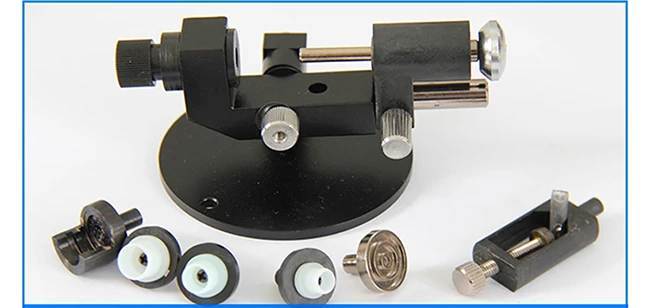
The holder set is another documented component. Describe the shape and dimensions of the objects you want to hold. Ask how each object is positioned and which holders are supplied for the two sides of the comparison setup.
Published model information
| Item | Published information |
|---|---|
| Model | A18.1831 |
| Directory designation | Comparison Microscope, Step Zoom, 3.2x–288x |
| Camera connection | Front-view photo adapter and CCD camera adapter described |
| LED source | 5W |
| Halogen source | 12V, 50W; fan cooling |
| Other listed lighting components | Ultraviolet lenses and filters |
| Sample positioning | Holder set described |
The magnification range above is the directory designation. Request the objective, eyepiece, and adapter specifications for the configuration being quoted.
Prepare a camera and lighting checklist
Decide first whether the microscope will be used mainly through the eyepieces, with a camera, or with both. For a camera-based setup, identify the image files and viewing arrangement your team needs. Ask for the camera, software, and computer items to be listed separately from the microscope and optical adapters.
Next, specify how your samples will be illuminated and positioned. A description of material, surface finish, and object dimensions is more useful than a general request for a complete microscope. If the same objects must be repositioned frequently, explain that handling requirement when discussing holders.
For purchasing, keep the optical configuration, lighting, adapters, camera, and holders on one itemized list. This makes it easier to see what each quotation covers and which items remain optional. Include your destination and quantity when requesting the commercial terms.
Review another step-zoom listing
See the A18 equipment directory for the model groups. The A18.1825 step-zoom comparison microscope is a separate listing with its own objective-step information. Compare the optical configuration and recording accessories of each model against your requirements.
A18.1831 questions
Can I use a camera that I already own?
The source describes photo and CCD camera adapters, but that is not a compatibility list for every camera. Send the camera model, mount, and intended image output so the adapter and connection arrangement can be checked.
Which light-source details are published?
The page lists a 5W LED source and a 12V, 50W fan-cooled halogen source. The full page also names ultraviolet lenses and filters. Ask which of these components is included and request the current filter details.
What optical information should I request?
Ask for the objectives, eyepieces, total magnification combinations, field of view, and working distance. Include any required sample clearance and camera connection. These details will help you evaluate the offered system beyond the directory designation.
Request the current A18.1831 configuration
Send the model number, application requirements, and the components you need to include. Ask OPTOEDU for a configuration quote.
Reference: published A18.1831 product description.