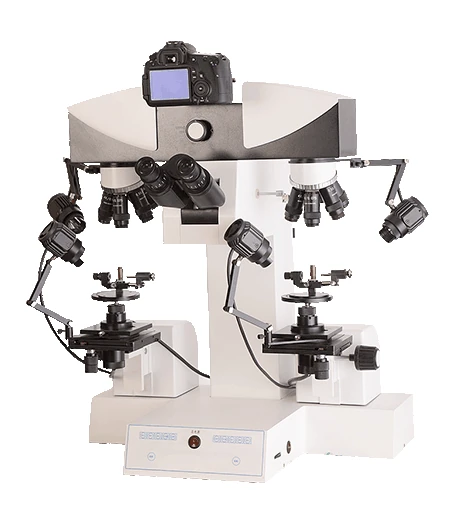
Set up the view and the movement controls
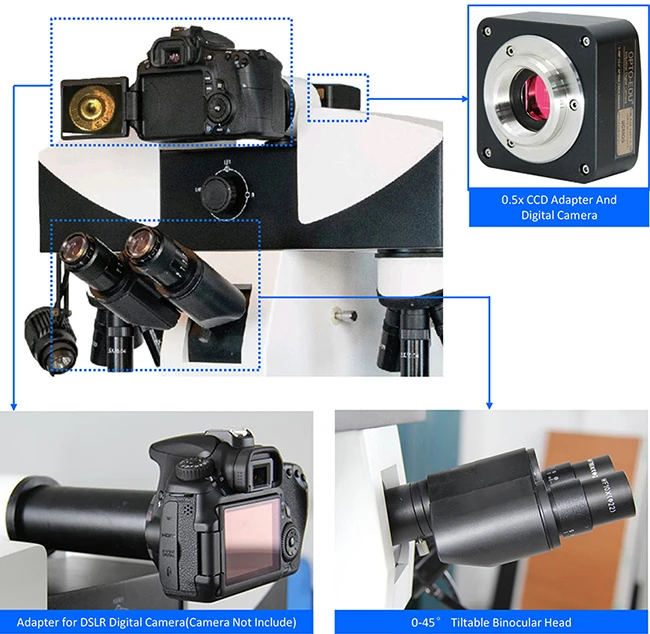
The binocular-head description gives an interpupillary-distance range and adjustable diopters. These are useful details when several operators will share the instrument. Ask how the head adjustment works with the camera connection and the working position you intend to use.
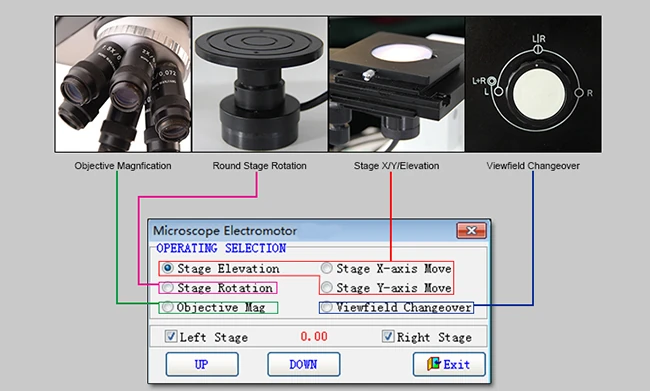
The listed controls cover full, split, and overlapping images; working-stage X/Y/elevation movement; and round-stage rotation. Objective-magnification control is marked optional. Distinguish these functions in the inquiry so the proposed control arrangement is explicit.
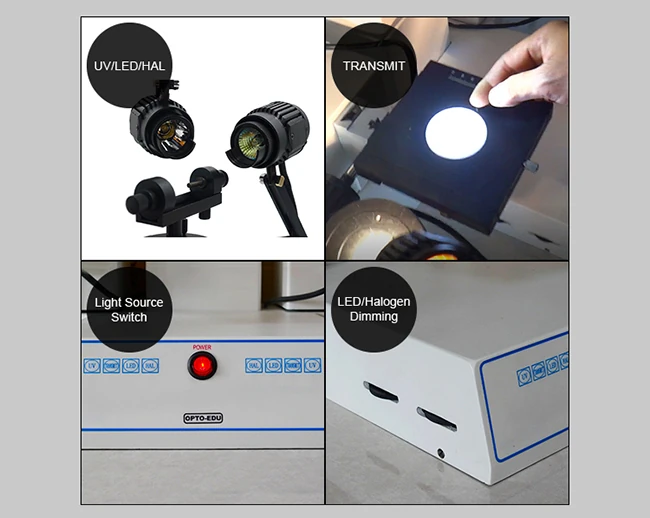
The light-source section names ultraviolet, LED, halogen, and transmitted illumination with adjustable brightness. The source also lists a holder set. Describe the objects and lighting modes that matter to your task, and ask for the supplied lamps, filters, and holders to appear on the equipment list.
Published model information
| Item | Published specification or feature |
|---|---|
| Total magnification | 2x–240x |
| Nosepiece | Six positions |
| Binocular head tilt | 0–45° |
| Interpupillary distance | 48–75mm |
| Diopter adjustment | ±5 |
| Viewing modes | Full, split, overlapping |
| Stage controls described | X/Y/elevation movement and round-stage rotation |
| Objective-magnification control | Motorized/manual option described as optional |
| Illumination section | UV, LED, halogen, transmitted light; brightness adjustment |
Request the offered optical combination and control specification before comparing configurations.
Make the image workflow part of the inquiry
The model page describes a built-in digital color camera, but the reviewed text does not give a complete sensor and output specification. Ask for those details if you need to save images or use them in reports. Include the file formats and viewing arrangement your team expects to use.
For motorized operation, explain the sequence of movements rather than simply asking for automation. Which object needs rotation? When does the operator change magnification or the split view? This gives the control discussion a practical starting point and helps identify optional items.
List the objects to be held, their dimensions, and the space available around the microscope. Request a configuration sheet covering the optics, movement controls, illumination, holders, camera, and software. Add quantity and destination when asking for price and delivery terms.
Review another motorized model
Browse the A18 equipment directory to see the model groupings. The A18.1832 touch-screen motorized model has a separately described computer and control configuration. Compare the proposed camera, operator controls, and optical combinations for the two listings.
A18.1829 questions
What adjustment is listed for the binocular head?
The page gives a 0–45° tilt range, 48–75mm interpupillary distance, and ±5 diopter adjustment. Include the expected operator position in your inquiry and ask how the complete viewing arrangement fits your workspace.
Are objective changes described as motorized?
The control description marks motorized/manual objective-magnification control as optional. Ask whether it is included in the proposed configuration and how it is operated alongside the stage and viewing controls.
What camera details should I request?
Ask for the camera sensor, image outputs, connection method, and supplied software version. State whether you need live viewing, saved images, or report output so the proposed digital configuration can be reviewed against those tasks.
Request the current A18.1829 configuration
Send the model number, application requirements, and the components you need to include. Ask OPTOEDU for a configuration quote.
Reference: published A18.1829 product description.