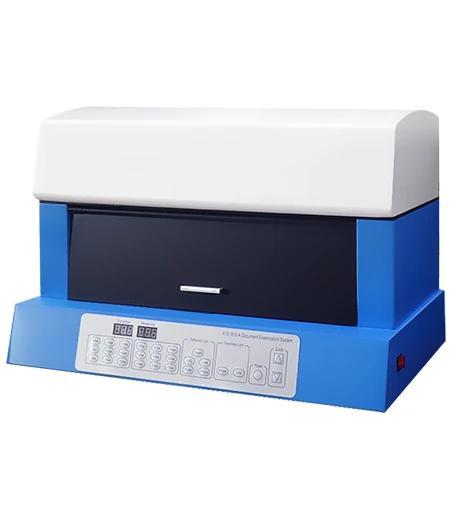
Review the chamber and control layout
The source describes selecting light sources and receiving filters from the control panel according to the document or object. If your procedure uses defined light and filter combinations, list them in the inquiry and request the available settings for the proposed variant.
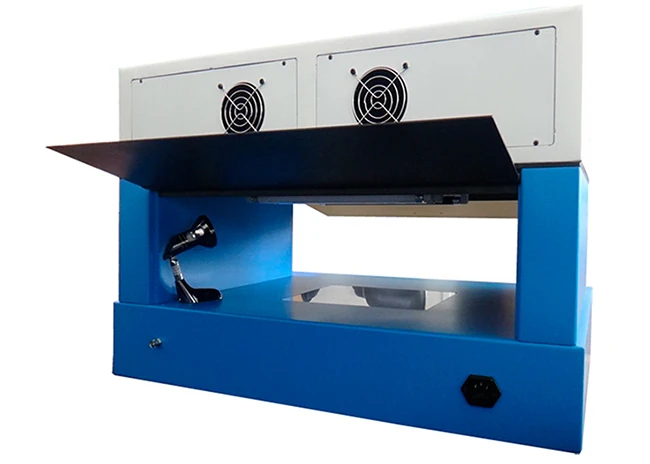
The illustrated A18.1816-A has doors opened at both sides. This is relevant when discussing document access, but the page does not give a usable chamber-size table. Describe the document dimensions and handling restrictions so the available access and working space can be checked.
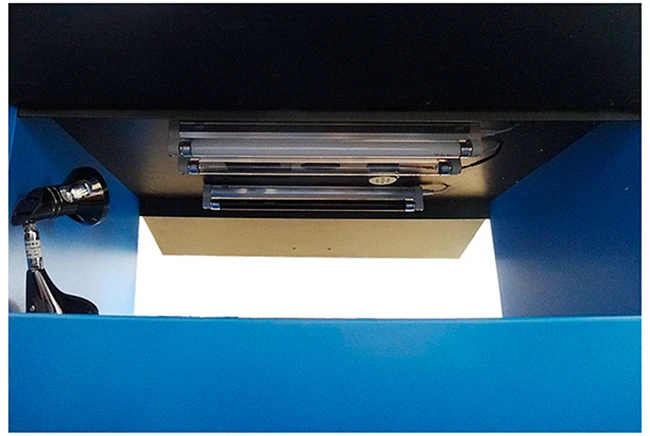
The images also show a lighting arrangement inside the chamber. Use those photographs to discuss component placement, then ask for the written light-source and filter specifications. Keep the variant designation with the specification sheet so the proposed equipment remains clear throughout the quotation.
Published model information
| Item | Published information and confirmation field |
|---|---|
| Directory model | A18.1816 |
| Detail-page variant | A18.1816-A |
| Product type | Document Examination System |
| Controls described | Power controls; light-source and receiving-filter selection |
| Document access shown | Doors open at both sides on the illustrated A18.1816-A |
| Configuration to request | Exact variant, light sources, filters, imaging equipment, software, and examination space |
Ask for the current model-specific specification sheet. Camera, magnification, filter wavelengths, and chamber dimensions should be identified for the offered variant.
Turn the examination method into a specification request
Start with the object. Tell OPTOEDU the document type, dimensions, thickness, and whether it is loose or bound. Explain any restrictions on repositioning it. Ask for the usable chamber space and the access dimensions needed to check how it can be examined.
Then list the observation modes required by your procedure. Request the available light sources, receiving filters, and their selection controls. If image recording is required, ask which camera, connection, software, and computer arrangement is offered. Include your file-format and record-output requirements.
Finally, ask for a configuration list carrying the full variant name. Separate the examination unit, imaging components, software, computer, accessories, and packing. Supply quantity and destination for the quote, and ask for the relevant documentation alongside the commercial terms.
Compare the documented configurations
See the A18 equipment directory for the document-examination group. The A18.1818 document examination system is a separate listing with published zoom and filter-band information. Compare each model's own configuration sheet and confirm the variant rather than assuming a common specification across the directory.
A18.1816 questions
Which model designation should be used in an inquiry?
Refer to the directory model A18.1816 and ask whether the offered configuration is A18.1816-A. The detail captions and linked catalogue use the A variant. Have the complete designation written on the quotation and specification sheet.
What document-access information is available?
The detail page shows the illustrated A18.1816-A with doors open on both sides. Ask for the usable examination space and access dimensions, then provide the document size and handling requirements to check the fit.
What imaging specifications should I request?
Ask for the camera, magnification or field of view, image outputs, software, and computer connections included with the selected variant. Request the lighting and filter details at the same time so the complete observation arrangement can be reviewed.
Request the current A18.1816 configuration
Send the model number, application requirements, and the components you need to include. Ask OPTOEDU for a configuration quote.
Reference: published A18.1816 product description.